
The Multitasking Blind Spot in PC Performance Testing
November 11, 2026
Turning measurement into a decision
Most IT performance conversations start with a single task. How fast does a laptop open a spreadsheet? How long does a video export take? These are useful questions, but they describe a PC working alone. That is rarely how people actually use their PCs.
A typical workday looks different. A user might have a dozen browser tabs open, a video call running in the background, an email syncing, a spreadsheet mid-calculation and a chat app pinging - all at the same time. None of these activities happens in isolation. They compete for the same CPU cycles, memory and graphics resources.
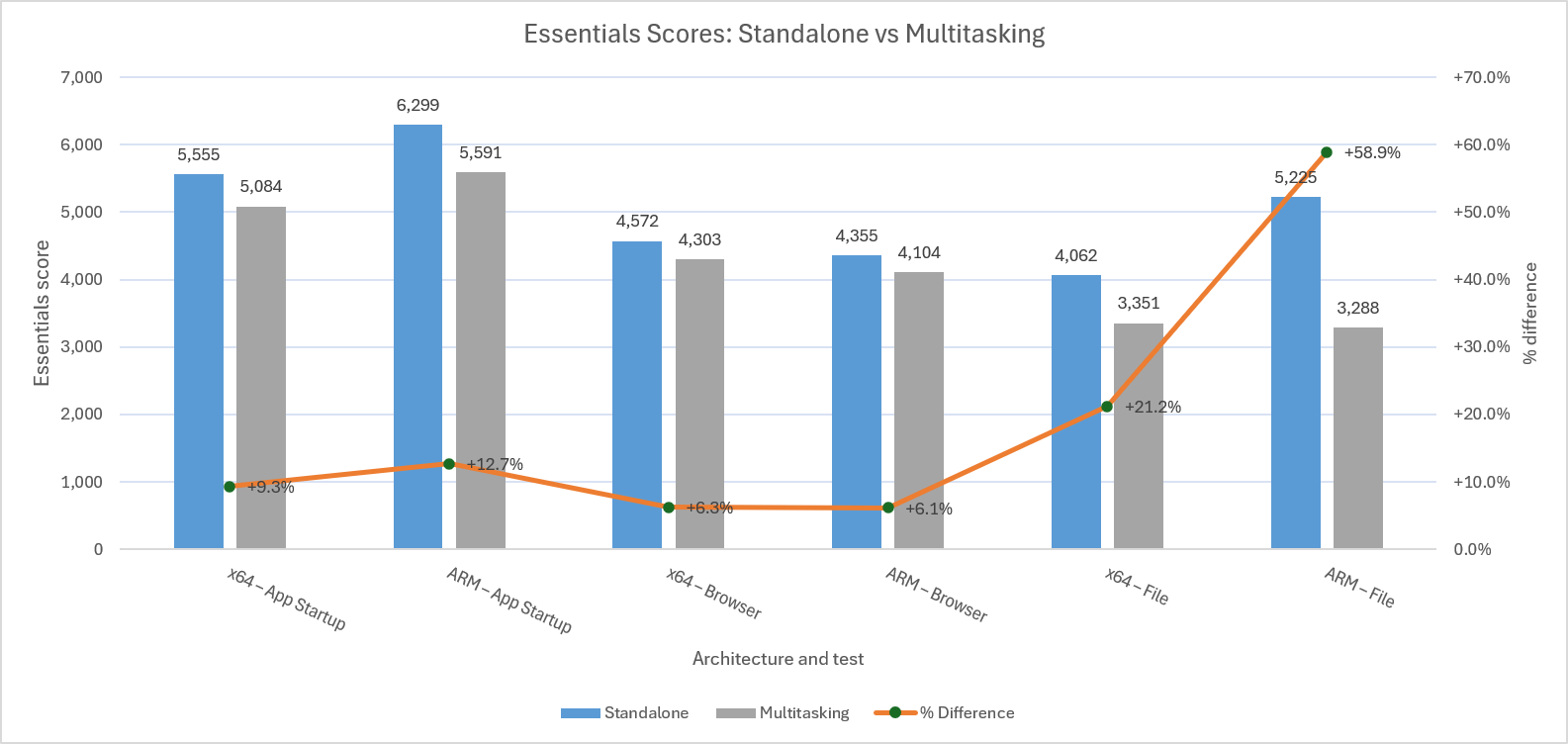
This is the gap that individual task benchmarks can miss. A PC that scores well on a single-application test may behave differently once several activities are running together. That does not mean single-task testing is wrong. It means it answers a narrower question than many IT teams actually need answered.
Why multitasking performance matters for IT decision-makers
For CIOs, IT directors and procurement teams, this distinction has practical consequences. Specifications alone can be difficult to translate into real-world experience. Two PCs with similar processors and memory can behave differently under sustained multitasking, depending on thermal design, storage speed or how efficiently the operating system manages background load.
These matter at several points in the PC life cycle. During procurement, it helps teams compare competing configurations beyond price and specification sheets. During fleet standardization, it provides a consistent baseline for what "good enough" performance looks like across an organization. During hardware refresh cycles, it helps determine whether new devices offer a meaningful improvement rather than just a newer badge. When IT operations teams are troubleshooting complaints about a slow PC, multitasking data can help separate genuine hardware limitations from configuration or software issues.
For digital workplace and end-user computing (EUC) teams, this is also a way to translate day-to-day employee experience into something measurable. "The laptop feels sluggish" is hard to act on — a repeatable multitasking score is not.
What realistic measurement looks like
This is the problem Procyon Essentials, the newest benchmark in the Procyon® suite, part of ULTRUS® software from UL Solutions, is built to address. Rather than testing one task in isolation, it runs foreground activities such as app startup, browsing and file operations while background workloads, including up to 30 open browser tabs and simulated video call activity, run at the same time.
The result is a single score that reflects how a system holds up when multiple demands overlap, rather than how it performs when nothing else is competing for resources.
Procyon Essentials sits alongside the rest of the Procyon benchmark suite, which includes benchmarks for office productivity, AI inference, battery life and photo and video editing. Each answers a different question about PC performance. Multitasking is one part of a broader picture, not a replacement for it.
Building confidence through consistent performance testing
The value of any benchmark depends on consistency. Running the same scripted scenario under the same conditions, on every system being compared, is what makes results usable for procurement requests, OS image validation, or checking whether a software update has affected fleet performance. Without that consistency, IT teams are often left comparing anecdotes rather than evidence.
If organizations want to understand how PCs perform for the people using them, this benchmark helps measure performance the way people actually work and not just the way a single task runs in isolation. Procyon Essentials and the wider Procyon suite give IT teams a consistent way to do that.
To see how Procyon® Essentials measures multitasking performance, or to explore the wider Procyon suite, visit benchmarks.ul.com/procyon
Recent news
-
The Multitasking Blind Spot in PC Performance Testing
November 11, 2026
-
Procyon® Is Ready to Benchmark NVIDIA RTX Spark
October 16, 2026
-
RAM Prices Are Forcing a Rethink of the PC Refresh Cycle
October 2, 2026
-
Seasonic joins as a sponsor of the next 3DMark GPU Benchmark
July 24, 2026
-
Announcing our next generation 3DMark GPU Benchmark and its first sponsor
June 3, 2026
-
Launching Procyon Essentials: a browser-focused benchmark for multitasking professionals
May 5, 2026
-
3DMark on MacOS now available directly from UL Solutions.
April 22, 2026
-
3DMark delisting of REDMAGIC 11 Pro phones
April 9, 2026
-
Introducing Computer Vision 2.0, Our Next‑Generation AI Hardware Benchmark
March 30, 2026
-
Procyon® AI Benchmarks Provide Full Coverage and Actionable Performance Insights
January 13, 2026
-
Procyon Labs launches with FLUX.1 AI Image Generation Demo
November 4, 2025
-
3DMark Solar Bay Extreme is available now!
August 20, 2025
-
3DMark Speed Way Teams up with PC Building Simulator 2!
July 17, 2025
-
New Procyon AI Benchmark for Macs now available
June 25, 2025
-
3DMark for macOS available now!
June 12, 2025